Overview of Operating Systems
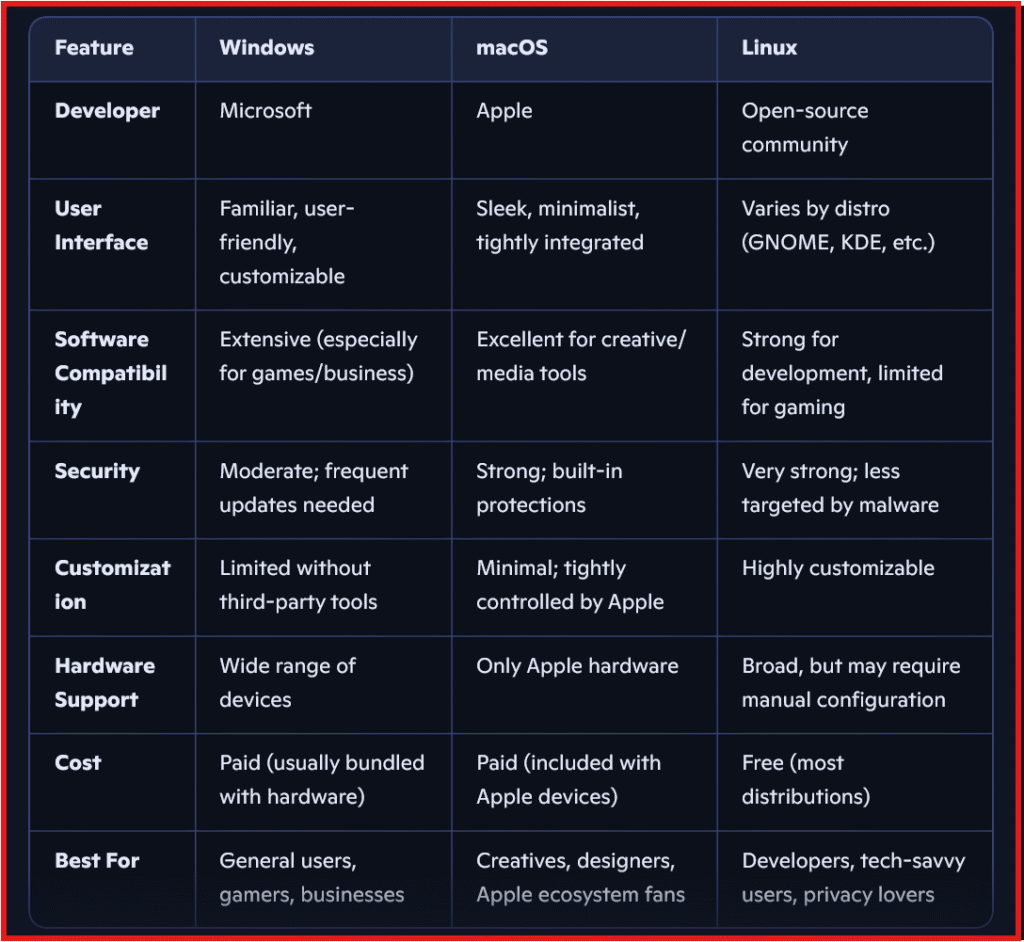
An operating system (OS) serves as the intermediary between computer hardware and the user. It is the foundational software that manages computer resources and facilitates interaction between users and the machine. The OS determines how the computer responds to user commands, runs applications, and accesses hardware components such as the memory and storage devices. Among the myriad of operating systems available today, three have emerged as the predominant players in personal computing: Windows OS, Mac OS, and Linux OS.
Windows OS, developed by Microsoft, is the most widely used operating system globally, capturing a significant share of the personal computing market. It is known for its user-friendly interface and broad compatibility with a vast array of third-party software. Targeted primarily at home users and businesses, Windows OS has consistently dominated the market, making it the go-to choice for a large segment of the population. Its versatility and extensive support for various hardware configurations have cemented its position as the leading OS in personal desktops and laptops.
In contrast, Mac OS, designed by Apple, appeals primarily to creative professionals and users within the Apple ecosystem. Renowned for its sleek interface and stability, Mac OS offers seamless integration with other Apple devices, delivering a cohesive user experience. While its market share is smaller than that of Windows, it has a loyal user base that values performance and design. Mac OS is optimized for creative applications, making it a preferred choice for graphic designers, video editors, and musicians.
Lastly, Linux OS offers an open-source alternative that has gained traction among tech enthusiasts, developers, and organizations seeking customizable solutions. Its flexibility allows users to tailor the operating system to meet specific needs, making it suitable for servers and advanced computing tasks. Linux OS is widely recognized for its security and stability, though it requires a steeper learning curve for new users compared to its Windows and Mac counterparts.
User Interface and Experience
The user interface (UI) and overall user experience (UX) significantly contribute to how users interact with their operating systems. Each OS—Windows, Mac OS, and Linux—offers distinct visual designs, navigation systems, and customization options, which directly influence user satisfaction and productivity.
Windows OS is known for its highly functional interface characterized by the Start Menu and Taskbar. The layout is designed to accommodate both novice and experienced users alike. The graphical interface is familiar to many, and it provides straightforward access to applications and settings. With numerous customization options, users can personalize their desktops and toolbars to suit their preferences. This flexibility allows for a tailored experience, enabling users to organize their workflow as desired.
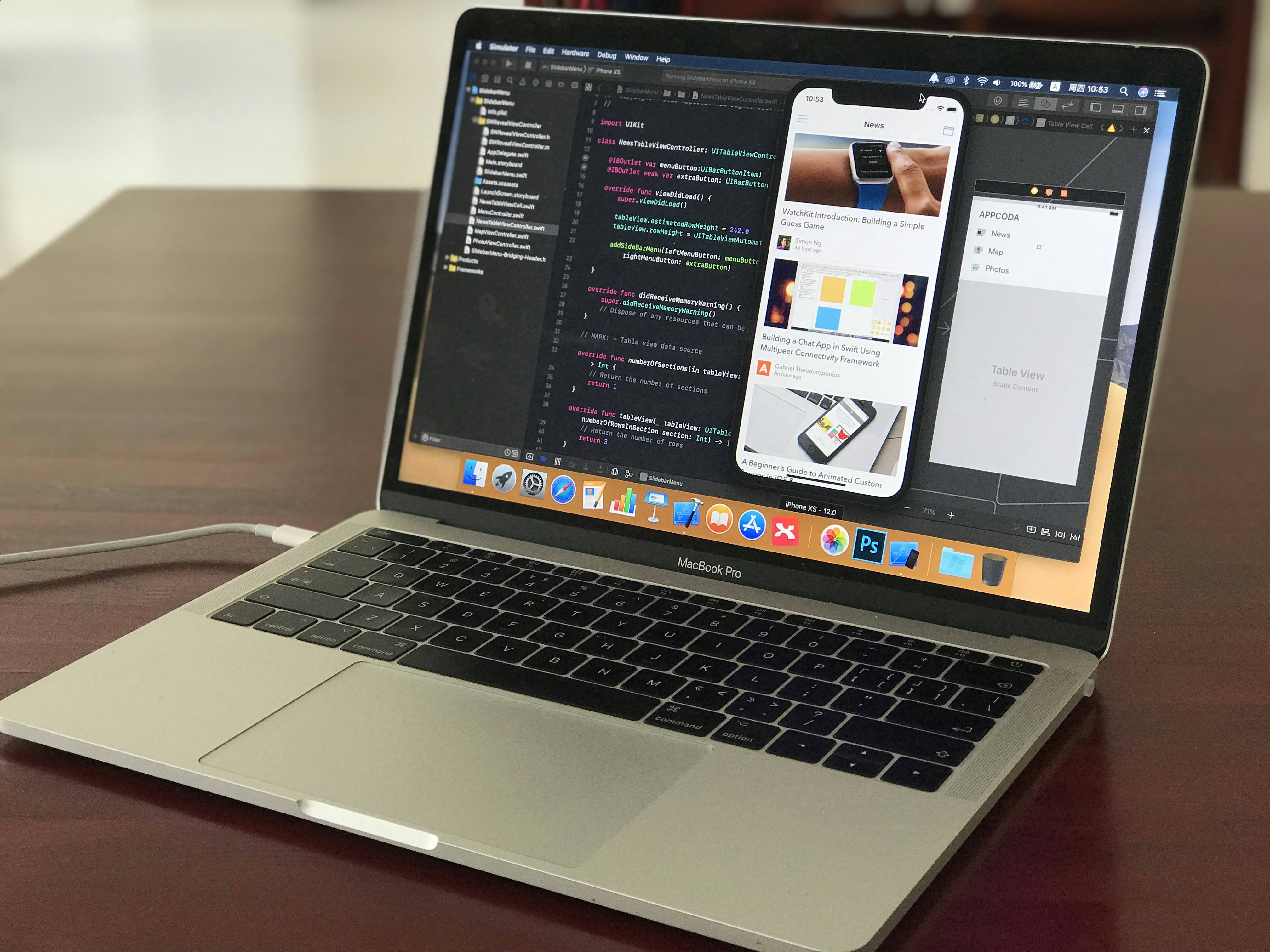
In contrast, Mac OS presents a more streamlined and aesthetically pleasing interface. Its Dock and Menu Bar foster an intuitive experience, focusing on simplicity and coherence. The design emphasizes usability, allowing for seamless multi-tasking, with applications readily accessible at the bottom of the screen. Furthermore, Mac OS is known for its visually appealing icons and animations, which contribute to an engaging user experience. Its customization options, while not as extensive as those of Windows, still allow users to modify settings to fit their unique requirements.
Linux OS, on the other hand, exhibits a high degree of diversity, as various distributions (distros) feature different interfaces. For instance, Ubuntu uses the GNOME desktop environment, while others may utilize KDE or XFCE. This variability allows users to choose a UI that best matches their preferences. While Linux can have a steeper learning curve, its open-source nature provides the ultimate level of customization. Moreover, many distros come equipped with accessibility features, catering to a broad spectrum of user needs, such as voice commands, screen readers, and various input methods.
Overall, the user interface and experience across Windows OS, Mac OS, and Linux OS illustrate how different designs and functionalities cater to diverse user needs, ultimately affecting daily computing experiences. Understanding these distinctions enables users to make more informed decisions regarding their choice of operating systems.
Software Availability and Compatibility
When discussing operating systems, one of the most impactful factors for users is the availability of software and its compatibility with other systems. Each operating system has its unique ecosystem of applications that are tailored to their respective platforms. Windows OS is notably known for its extensive range of proprietary software. Popular applications, for instance, Microsoft Office and Adobe Creative Suite, are primarily developed for Windows, making it a go-to choice for businesses that rely on these essential tools. Furthermore, Windows is widely adopted in gaming; numerous titles are available solely on this platform, presenting significant advantages for gamers.
Conversely, Mac OS offers exclusive applications that target creative professionals, such as Final Cut Pro and Logic Pro, which are highly regarded in the fields of video editing and music production. Apple emphasizes an integrated hardware-software experience, resulting in many applications being optimized for Mac. This exclusivity, while beneficial for certain user demographics, can limit compatibility with software used in other environments, thereby creating challenges for users transitioning from Windows or Linux platforms.
In the realm of Linux OS, the software landscape is distinctly shaped by open-source philosophy. The availability of software is extensive, including a myriad of applications for productivity, development, and system tools, such as LibreOffice and GIMP. However, Linux users may encounter compatibility issues since many commercial software developers do not support this platform, leading to potential gaps, particularly in gaming and specialized industry applications. Additionally, users looking to migrate from proprietary environments might face a significant learning curve.
Compatibility concerns often arise in cross-platform environments where users employ multiple operating systems. File formats, software capabilities, and even simple executables may behave differently, making it imperative for users to consider their compatibility needs when selecting an operating system. Understanding the software landscape of each OS is essential for effective decision-making in both personal and professional settings.
Security and Performance
When evaluating operating systems, security and performance are crucial elements that significantly influence user experience. Windows OS, Mac OS, and Linux OS each approach these aspects in distinct manners. Windows OS has historically been viewed as more susceptible to malware, given its vast user base and architecture. This widespread use attracts cybercriminals, leading to a plethora of viruses and malware targeting this platform. However, Windows has invested heavily in enhancing its security features, integrating robust built-in functions such as Windows Defender antivirus, Windows Firewall, and regular security updates aimed at mitigating these risks.
In contrast, Mac OS is often perceived as more secure out of the box. Apple’s operating system includes various built-in security features such as Gatekeeper, which restricts the installation of unauthorized software, and XProtect, which provides constant malware detection. Moreover, Mac OS adopts a Unix-based architecture, which inherently offers better permission controls ensuring that unauthorized applications are less likely to gain elevated permissions without explicit user consent. However, as the user base grows, so does the interest from malicious entities, making it crucial for users to remain proactive.
Linux OS, renowned for its strong security model, is often the choice for environments demanding heightened security. With its open-source nature, Linux benefits from continuous scrutiny by a global community of developers, leading to quicker identification and resolution of vulnerabilities. Linux distributions typically provide extensive control over user permissions and comprehensive security options, such as SELinux and AppArmor, ensuring data integrity. Performance-wise, Linux is lauded for its efficient use of system resources, often requiring less memory and CPU compared to Windows and Mac, making it particularly suitable for servers and older hardware.
In light of these considerations, the choice between Windows OS, Mac OS, and Linux OS should reflect the specific security needs and performance requirements of the user or organization, balancing usability with effective protection.
🖥️ Operating System Comparison: Windows vs macOS vs Linux